A LITTLE LESS SEARCHING. A LITTLE MORE DOING.
Your project shortcuts.
One place to find them.
Keep files, folders and useful websites together in a desktop dashboard. Press Ctrl+Alt+Q to bring it back when you need it.
Windows 11 only · Intel/AMD 64-bit PCs. This app does not install on Android, iPhone, iPad or macOS.
Final release checks are under way. The Windows installer is not available yet.
Use another operating system? Tell us which one. Opens your email app. This records interest, not a promise of a release or date.
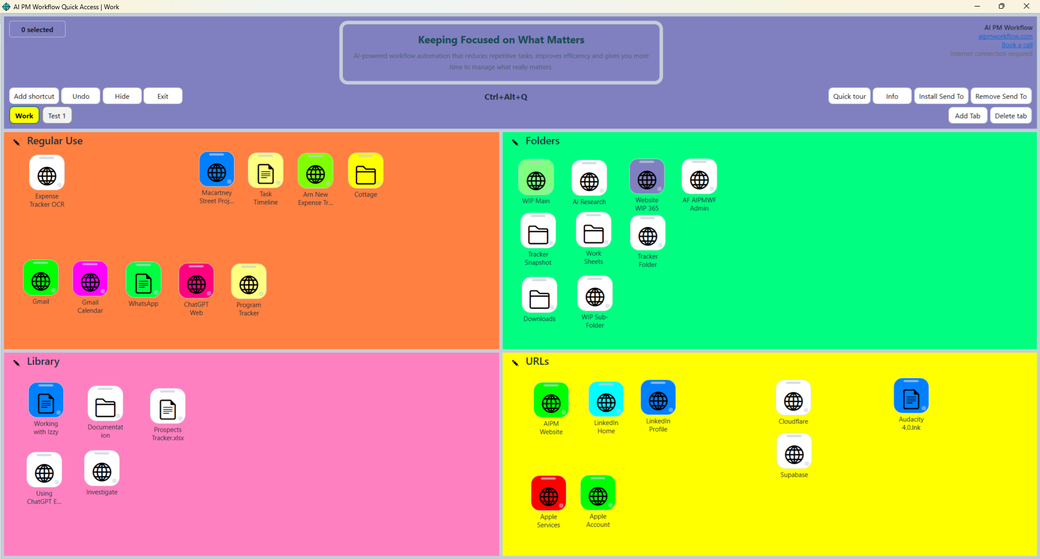
Make it your own
- Organise shortcuts across four resizable quadrants and up to five project tabs.
- Rename headings and tabs, and choose colours that help you recognise your work.
- Open files and websites without moving the originals.
- Add shortcuts from Windows Explorer using the optional Send To integration.
Finding your way around
The built-in Quick tour gives an overview. The searchable Detailed guide explains right-click editing, colours, tabs and Undo. To move a shortcut between quadrants, right-click it and choose Move to.
Hide, the close button and Esc leave the app running in the tray. Exit stops it. After Exit, launch it again from its desktop or Start menu shortcut before using the hotkey.
Using an older version of Windows?
If you would find Quick Access useful on an older Windows version, let Oliver know which version you use. Your feedback will help prioritise possible future releases. Compatibility with older versions is not currently confirmed.
Would a quick walkthrough help?
Installation is straightforward, but if you would like help getting started or making the most of Quick Access, Oliver would be happy to give you a 15-minute walkthrough. Book a Quick Access walkthrough through the booking system and mention Quick Access in your booking.
Questions or feedback? Email Oliver.